
MOTORSPORT TIMING CLOCK

Motorsport Timing Clock is a professional trackside countdown and session timing display built for race teams, engineers, drivers, and event crews.
Designed for use on garage monitors, pit wall screens, TVs, and laptops, it gives your team a clear live view of the current session, the next session, time of day, running order, trackside notes, and live weather. Instead of relying on handwritten notes, phone alarms, or messy spreadsheets, Motorsport Timing Clock keeps the whole team aligned with what is happening now and what is coming next.
Whether you are managing practice sessions, qualifying, race starts, driver briefings, or turnaround windows, the clock makes key timing information impossible to miss.
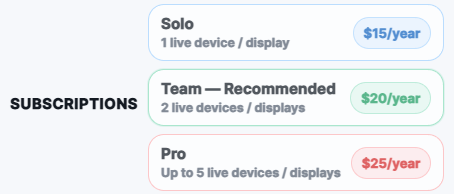
Features include live countdown display, session schedule control, current and following session boxes, optional running order, custom team logo support, light/dark display modes, adjustable font sizing, fullscreen display, trackside notes, live weather, and subscription-based access for Solo, Team, and Pro users.
Built specifically for motorsport environments, it is clean, readable, and practical — exactly what you want when the garage is busy and everyone needs the same information at a glance.
PRICING
DOWNLOAD
Download the Windows installer from our Google Drive folder. After installing, open Motorsport Timing Clock and create an account or log in to choose your Solo, Team, or Pro subscription.
Current version: v1.5.9
Windows 10 / Windows 11
Windows may show a SmartScreen warning because this is a new independent app. If prompted, choose “More info” → “Run anyway”.
Motorsport Timing Clock Example 1
Dark Mode and Running Order
Running Order Shown, example shows current sessions bordered / highlighted in green, next session counting down in blue border / highlight / font colour.

Motorsport Timing Clock Example 2
Light Mode and Running Order
Dynamic Colouring changes when under 30 Minutes to go. Shows gaps in Running Order between sessions.

Motorsport Timing Clock Example 3
Light Mode and Running Order Hidden
Fullscreen option for clarity, with Running Order hidden.

Motorsport Timing Clock
Settings
Fully customisable settings for display, session times and more. Can save to and load from csv file.
